62443 Maintenance Specialist Study Guide
Condensed, original study notes for the ISA/IEC 62443 Cybersecurity Maintenance Specialist exam (course IC37), with a matching practice exam in this repository. Not affiliated with or endorsed by ISA or IEC.
On this page
- Exam at a glance and a 7-day plan
- 1 · The maintain phase and who does what
- 2 · Monitoring, alarms, event logs and SIEM
- 3 · Intrusion detection
- 4 · Network diagnostics and troubleshooting
- 5 · Patch and vulnerability management
- 6 · Malware protection, application control and hardening
- 7 · Backup, restore and recovery
- 8 · Account and access management
- 9 · Incident response and recovery
- 10 · Management of change, configuration management and audits
- Exam traps, tie-breakers and sources
Exam at a glance and a 7-day plan
| Item | Detail |
|---|---|
| Certificate | ISA/IEC 62443 Cybersecurity Maintenance Specialist |
| Course | IC37, IACS Cybersecurity Operations & Maintenance (self-paced: IC37M) |
| Format | 100 multiple-choice questions, closed book |
| Time | 2 hours, about 72 seconds per question |
| Delivery | Meazure Learning test center, or online with live remote proctoring |
| Result | Pass or fail. ISA does not publish the passing score |
| Prerequisite | The Fundamentals Specialist certificate |
| Counts toward | The ISA/IEC 62443 Cybersecurity Expert designation, with Fundamentals, Risk Assessment and Design |
This exam is about running an IACS securely, day after day. ISA's published objectives cover network diagnostics and troubleshooting; reading device alarms and event logs; backup and restore; the patch management lifecycle; antivirus management; the basics of application allowlisting, network and host intrusion detection and security information and event management (SIEM); putting an incident response plan and a management of change procedure into practice; and carrying out a basic security audit.
The course labs name Snort for intrusion detection. A partner version of the course also lists Microsoft WSUS for patching, PLC backup and configuration management, a management of change form, log monitoring, vulnerability scanning, packet capture analysis, and troubleshooting and forensics. Expect practical questions: what to check first, which log or tool shows a given event, the right order for a patch or a restore, and how to respond to an alert without harming the process.
| Day | Read | Practice |
|---|---|---|
| 1 | The maintain phase; monitoring and logs | Quick 20 for a baseline, then domains 1–2 |
| 2 | Intrusion detection; network diagnostics | Domains 3–4 |
| 3 | Patching; malware protection and application control | Domains 5–6 |
| 4 | Backup and recovery; accounts and access | Domains 7–8 |
| 5 | Incident response; change, configuration and audits | Domains 9–10 |
| 6 | Nothing new | Full 100-question mock under time, then review misses |
| 7 | Traps and tie-breakers; your two weakest domains | Second mock. Aim for 80% or better in every domain |
Original study notes, not ISA course material. Not affiliated with or endorsed by ISA or IEC. Check details against your licensed copies of the standards and your vendors' documentation.
1 · The maintain phase and who does what
The IACS lifecycle runs from identification and assessment, through design and implementation, to operations and maintenance. The last phase is by far the longest, often decades, and it is where security either holds or quietly erodes.
Security drift. After handover, configurations change, temporary fixes become permanent, accounts pile up, patches lag, firewall rules loosen and drawings go stale. The achieved security level (SL-A) slides below the target (SL-T) unless maintenance work keeps pulling it back.
| Activity | Purpose | Where the requirements live |
|---|---|---|
| Monitoring and logging | Notice attacks and failures early | 62443-3-3 FR 6; 2-1 EVENT; 2-4 SP.08 |
| Patch and vulnerability management | Close known holes safely | 62443-2-3; 2-1 COMP 3; 2-4 SP.11 |
| Malware protection and application control | Stop malicious code from running | 2-1 COMP 2; 2-4 SP.10 |
| Backup and restore | Recover from failure or attack | 2-1 AVAIL 2; 2-4 SP.12 |
| Account and remote access management | Keep access appropriate and controlled | 2-1 USER and NET 3; 2-4 SP.07 and SP.09 |
| Incident response | Contain, eradicate and recover | 2-1 EVENT 1 |
| Management of change and configuration management | Keep every change controlled and documented | 2-4 SP.06 |
| Audits and reassessment | Verify that controls still work | 2-1 ORG 2 |
Roles in operation
- Asset owner: accountable for the IACS; approves changes; accepts residual risk; often runs its own maintenance team.
- Maintenance service provider: delivers the capabilities the contract specifies, such as patching, backups or account management, at an agreed maturity level (62443-2-4).
- Product supplier: qualifies and delivers security updates, publishes advisories, and announces end of support (62443-4-1 security update management).
- Integrator: hands over accurate documentation and supports the solution during warranty.
What maintainers need to hand: the asset inventory, network and zone and conduit drawings, the CRS, configuration baselines, backup records, and procedures for patching, backup and restore, incident response and management of change, plus the vendors' hardening guides.
A configuration baseline is the approved, documented configuration of a device or system (firmware, settings, rules, accounts). Comparing the running configuration with it is how drift is found.
Exam angle: maintenance keeps SL-A at SL-T over time; the asset owner stays accountable; service providers deliver what the contract specifies; vendors supply updates and information; the documentation must stay current.
2 · Monitoring, alarms, event logs and SIEM
Where security-relevant events come from
| Source | Examples |
|---|---|
| Controllers and devices | Run or program mode changes, logic downloads, firmware changes, CPU load spikes, communication faults, unexpected restarts |
| HMI, SCADA and DCS journals | Logins, operator actions, setpoint changes, alarm acknowledgments |
| Operating systems | Windows Security, System and Application logs; Linux syslog |
| Network devices | Firewall allow and deny logs, switch ports going up or down, new MAC addresses, VPN logins |
| Security tools | Antivirus and allowlisting alerts, IDS alerts, backup job results |
| Physical systems | Badge readers, cabinet door switches |
Early indicators of an attack, or of a failure that looks like one: logins at odd times or from odd places, bursts of failed logins, new accounts or services, cleared logs, unknown devices, unusual protocols or connections (an engineering protocol coming from an HMI, say), controller mode changes outside maintenance, unexpected firmware downloads, rising network load, and security tools switched off.
| Windows event ID | Meaning |
|---|---|
| 4624 | Successful logon |
| 4625 | Failed logon |
| 4720 | User account created |
| 4740 | Account locked out |
| 4688 | New process created |
| 7045 | New service installed (System log) |
| 1102 | Security audit log cleared |
| Syslog severity | Name |
|---|---|
| 0 | Emergency |
| 1 | Alert |
| 2 | Critical |
| 3 | Error |
| 4 | Warning |
| 5 | Notice |
| 6 | Informational |
| 7 | Debug |
SIEM. A security information and event management system collects logs centrally, normalizes them, correlates events across sources, alerts, and retains them. Correlation is the point: a VPN login, a new process on an HMI and a controller mode change are each minor alone and alarming together. A SIEM needs synchronized clocks, a baseline of normal behavior, tuning to cut false positives, defined use cases, and people to respond. In OT, collect logs within each zone or in the DMZ and let them flow outward through the conduits; the SIEM should not open connections into control zones.
Good log management
- Decide what to log based on risk, and make sure the events required by 62443-3-3 SR 2.8 are captured.
- Timestamp from a trusted time source (SR 2.11), and keep enough storage, with alerts before it fills (SR 2.9) and a defined response if logging fails (SR 2.10).
- Forward logs off the host quickly and protect them from tampering; tie actions to individual accounts so nobody can deny them (SR 2.12).
- Review routinely, keep logs for the period policy requires, and make them available to authorized people and tools (SR 6.1). Continuous monitoring (SR 6.2) turns logs into detection.
- Route security alerts to security staff instead of flooding operators' alarm lists.
Exam angle: 4625 is a failed logon and 1102 a cleared audit log, a classic sign of an intruder covering tracks; synchronized time makes correlation possible; logs flow out of control zones, not the other way.
3 · Intrusion detection
| Type | Watches | Strengths | Limits |
|---|---|---|---|
| Network IDS (NIDS) | Copies of traffic from a SPAN port or network tap | Passive; covers many devices at once, including PLCs that cannot run agents | Cannot read encrypted payloads or see activity that stays inside a host; needs good placement |
| Host IDS (HIDS) | Files, logs, processes and settings on one host | Sees local changes such as new services or altered files | Needs an agent, vendor approval and host resources; not for embedded devices |
How detection works
- Signature (rule) based: matches known attack patterns. Few false alarms for known attacks, but misses new ones and needs regular rule updates.
- Anomaly (behavior) based: learns a baseline of normal traffic and flags departures from it. Control networks are repetitive, which suits this method well, but legitimate changes cause alerts until the baseline is updated, and the learning period must be clean.
- Protocol-aware: understands industrial protocols, so it can flag, for example, a Modbus write to a PLC from a host that normally only reads.
IDS or IPS? An IDS only alerts. An intrusion prevention system (IPS) sits inline and blocks, so a false positive can cut legitimate control traffic. Inside control zones, prefer passive detection; inline blocking is easier to justify at the boundary between business and control networks.
Getting traffic to the sensor
| Option | Pros | Cons |
|---|---|---|
| SPAN (port mirroring) on a switch | Configuration only; no new hardware | Can drop packets under load; can be changed or misconfigured |
| Hardware network tap | Passive copy of every packet; cannot be reconfigured remotely | Must be installed in the link, usually during a short outage |
Place sensors at conduits and chokepoints: the DMZ, the boundary between supervisory and control networks, and core switches inside control zones.
Snort is an open-source network IDS and IPS, and the tool named in ISA's IC37 labs. A rule has a header (action, protocol, source address and port, direction, destination address and port) and options in parentheses (message, content to match, signature ID, revision). An illustrative rule:
alert tcp !$HMI_HOSTS any -> $PLC_NET 502 (msg:"Modbus write from non-HMI host"; content:"|06|"; offset:7; depth:1; sid:1000001; rev:1;)It alerts when any host outside the HMI group sends Modbus function code 6 (write single register) to the PLC network; in Modbus/TCP the function code follows the 7-byte header. Locally written rules use signature IDs of 1,000,000 and above. Similar open-source tools include Suricata and Zeek.
Tuning and triage
- Turn off rules that cannot apply (web attack rules on a Modbus network), suppress known benign flows, and use thresholds for noisy events.
- Add context to each alert: is this the engineering workstation during an approved change window?
- Classify alerts as true or false positives, escalate real ones through the incident response plan, and feed what you learn back into tuning.
Exam angle: IDS is passive and IPS is inline; anomaly detection suits stable OT traffic; taps do not drop packets the way a busy SPAN port can; know the parts of a Snort rule.
4 · Network diagnostics and troubleshooting
Work methodically: start at the physical layer and work up; divide the network to isolate the fault; compare with the known-good baseline; change one thing at a time; coordinate with operations and have a rollback; record changes through management of change. Keep both possibilities open: a "network fault" may be an attack, and an "attack" may be a fault.
| Tool | Shows | Notes for OT |
|---|---|---|
| ping | Reachability and round-trip time | ICMP may be blocked by design, and some devices rate-limit it |
| traceroute or tracert | The path, hop by hop | Shows where traffic stops |
| arp -a | IP-to-MAC mappings on a host | Changing or duplicate entries suggest an IP conflict or ARP spoofing |
| netstat or ss | Listening ports and open connections on a host | Unknown listeners or connections are red flags |
| ipconfig or ip addr | A host's addresses, mask and gateway | Check for duplicates and wrong gateways |
| Switch counters and logs | CRC errors, collisions, ports going up and down | Point to cabling, duplex or hardware faults |
| Packet capture (Wireshark) | Every packet in detail | Passive; filter on industrial protocols |
| SNMP network management | Device status, bandwidth, interface errors | Use SNMPv3, which adds authentication and encryption; v1 and v2c send community strings in clear text |
Common problems and their signs
| Problem | What you see |
|---|---|
| Network loop or broadcast storm | Very high utilization, everything slow, switch CPUs high; looks like a denial-of-service attack |
| Duplicate IP address | Intermittent connectivity; ARP entries flipping between two MAC addresses |
| Duplex mismatch | CRC errors and late collisions on one link; poor throughput |
| Multicast flooding, for example EtherNet/IP I/O without IGMP snooping | Devices overloaded by traffic they did not ask for |
| A scan or misbehaving device | Controllers dropping connections; bursts of resets |
| A firewall change gone wrong | Specific flows fail right after the change |
Early indicators worth investigating: unexplained changes in traffic volume, new talkers or protocols, repeated connection resets, rising broadcast rates and devices restarting.
Packet capture analysis
- Capture on the right segment through a SPAN port or tap, use capture filters to limit volume, and make sure clocks are synchronized.
- Use display filters such as
modbus,enip,cip,s7commordnp3for protocols,ip.addr == 10.1.1.5for one host, ortcp.flags.reset == 1for resets. - The conversations and protocol hierarchy statistics show who talks to whom, and with what.
- Look for unexpected write commands, new hosts, retransmissions and resets.
- If a capture may become evidence, hash it and record its chain of custody.
Securing management itself: put management interfaces on a separate management network, use SSH and HTTPS instead of Telnet and HTTP, change default SNMP community strings, and prefer SNMPv3.
Exam angle: physical layer first; loops and broadcast storms can look like attacks; arp for spoofing, netstat for unknown connections; SNMPv3 over v1 and v2c.
5 · Patch and vulnerability management
62443-2-3, a technical report, describes patch management for IACS: the roles of the asset owner and the product supplier, the patch lifecycle, and a common format in which suppliers report which patches they have tested with their products.
The asset owner's patch cycle
- Inventory: know the hardware, software and firmware versions installed.
- Monitor: vendor advisories, CISA ICS advisories, the NVD and the KEV catalog.
- Assess: does it apply here? How exposed is the asset? Is the flaw being exploited? What is the consequence? Then decide: patch now, patch at the next window, mitigate and defer, or accept.
- Vendor qualification: wait for the control system supplier to confirm compatibility.
- Test: functional and performance tests on a representative test system.
- Back up and plan the rollback.
- Deploy through management of change in a maintenance window, in stages: the standby of a redundant pair first, then switch over; less critical systems before critical ones.
- Verify: the process runs normally, the patch is installed and security functions still work.
- Record: update the inventory, the configuration baseline and the patch records.
Firmware for controllers, switches and other devices is usually riskier than an operating system patch: it often needs an outage and can change behavior. Check the digital signature or hash of every firmware or software package before installing it.
WSUS. Windows Server Update Services lets the owner approve specific Microsoft updates and distribute them from an internal server, so OT hosts never contact the internet. A common design places a downstream WSUS server in the DMZ or an OT management zone, synchronized from an upstream server on the business side. Approve only vendor-qualified updates, group computers by zone and criticality, and use the compliance reports.
When a patch cannot be applied (no vendor approval yet, no outage window, or an unsupported product), use compensating countermeasures: tighter segmentation, disabling the vulnerable service, allowlisting, IDS signatures for the exploit, stricter access and closer monitoring. Document the decision and a review date. An end-of-life product will never be patched again, so plan its replacement.
Vulnerability scanning in operation
- Authenticated (credentialed) scans log in and read installed versions accurately; unauthenticated scans only see what is exposed on the network.
- Scan only in approved windows, with fragile devices excluded.
- For devices that cannot be scanned safely, match the inventory's versions against advisories instead.
- Prioritize with exploitation status (KEV), exposure and consequence; CVSS is one input, not the answer.
Useful measures: patch compliance per zone, time from release to deployment, and the number of deferred patches covered by compensating controls.
Exam angle: back up and test before deploying; only vendor-qualified patches; stage the rollout; verify integrity before installing; compensate and document when you cannot patch.
6 · Malware protection, application control and hardening
| Approach | How it works | Strengths | Weaknesses |
|---|---|---|---|
| Antivirus | Blocks files matching known-bad signatures, plus some heuristics | Catches known malware; familiar to staff | Needs frequent signature updates; misses new malware; scans can load old hosts; needs vendor approval |
| Blocklisting (denylisting) | Blocks programs that are on a list | Simple to start | Anything not on the list still runs |
| Application allowlisting | Only approved programs, identified by hash, signature or path, may run | Stops unknown malware; no daily updates; suits fixed-function OT hosts | Must be updated with every legitimate change; needs a clean baseline and vendor support |
Running antivirus in OT
- Use the product, version and settings the control system vendor has qualified, including its exclusions for real-time files such as historian databases.
- Distribute signatures from an internal server in the DMZ after testing; OT hosts should never fetch updates from the internet themselves.
- Schedule full scans for quiet periods, and alert centrally on disabled protection or stale signatures.
- Prefer quarantine to deletion, so a false positive on a control file can be recovered.
Running allowlisting
- Build the baseline on a known-clean system.
- Run in audit mode first to see what would be blocked, then switch to enforcement.
- Update the allowlist through management of change whenever software changes, including patches, or the update will be blocked.
- Protect the agent's settings so only administrators can change them.
Removable media and USB ports
- Block USB mass storage with Group Policy (the removable storage access settings) or device control software, and fit physical port blockers where needed.
- Allow only approved devices, ideally encrypted ones, and scan media from outside at a dedicated kiosk before use.
- Disable autorun and autoplay, and log device use.
Hardening hosts and devices
- Apply least functionality: remove unused software and disable unused services, ports and protocols (62443-3-3 SR 7.7).
- Change default passwords; remove or disable guest and default accounts.
- Follow the supplier's hardening guidelines (62443-4-1 SG-3) and recognized industry benchmarks.
- Protect firmware settings with passwords, use secure boot where supported, and enable the host firewall.
- On controllers: keep them in run mode, turn off unused web, FTP or Telnet services, and change SNMP community strings.
- Re-check hardening after patches and changes, since both can quietly undo it.
Exam angle: allowlisting suits static hosts but must be updated with each change; antivirus needs vendor-qualified settings and an internal update source; control removable media technically, not just by policy; least functionality is the heart of hardening.
7 · Backup, restore and recovery
| What to back up | Notes |
|---|---|
| Controller logic and configuration (PLC, DCS, SIS, RTU) | After every change, with version history |
| Network and security device configurations | Switches, firewalls, VPN and wireless; export after each change |
| HMI and SCADA projects, graphics, alarm databases | The engineering projects needed to rebuild them |
| Workstation and server images | Full images allow a fast rebuild |
| Historian and batch data | Often replicated as well as backed up |
| Firmware, installation media, license keys | Needed to rebuild from bare hardware |
| Documentation | Inventory, drawings and procedures, with an offline copy |
Principles
- 3-2-1: three copies, on two kinds of media, one off site, and at least one offline or immutable so ransomware cannot reach it.
- RPO and RTO: the recovery point objective is how much data or configuration you can afford to lose, measured back from the incident; the recovery time objective is how soon the system must be running again. Together they set backup frequency and method.
- Full, incremental, differential: a full backup copies everything; an incremental copies changes since the last backup of any kind (quick to take, slower to restore because you need the whole chain); a differential copies changes since the last full backup (a restore needs the full plus the latest differential).
- Protect backups: limit access, use separate credentials from the production domain, record hashes to prove integrity, encrypt where appropriate, and keep them in their own zone.
- Prove them: restore regularly onto test hardware. A backup that has never been restored is not yet a control.
Configuration management for controllers. Keep approved versions of every controller program, and compare the running logic with the latest approved version on a schedule. Differences reveal unauthorized or undocumented changes, whether from an attacker or from a shortcut during a night shift.
Restoring after an incident
- Choose a backup that predates the compromise, and check it: compare hashes and scan it, or you may restore the attacker too.
- Rebuild in order: network and time services, authentication, servers, then workstations and HMIs, then verify the controller logic.
- Validate with operations before returning each part to service, and keep spares and matching firmware for critical hardware.
- Follow written, tested procedures that list the media, licenses and securely stored credentials needed.
In 62443-3-3, backup is SR 7.3 and recovery and reconstitution is SR 7.4; for service providers it is 62443-2-4 SP.12, and for asset owners 62443-2-1 AVAIL 2.
Exam angle: test restores; keep an offline copy; RPO is data loss, RTO is downtime; restore only from a backup known to be clean; back up after every change; compare running logic with the approved version.
8 · Account and access management
The account lifecycle follows people: a joiner's request is approved by the system owner and provisioned with least privilege; a mover's rights change with the new role; a leaver's access is disabled on the day they leave, and the account is removed after the retention period. Periodic reviews catch what the process missed.
| Account type | Used for | Controls |
|---|---|---|
| Named user | Day-to-day work | One per person; role-based rights; MFA where practical |
| Shared console login | Some HMIs need a station login that survives shift changes | A documented exception, with physical control of the room, application-level logging of individual actions and other compensating measures |
| Administrator | System administration | Separate from the person's everyday account; few in number; MFA; logged and reviewed |
| Service | Running services and applications | No interactive logon; strong unique credentials; a named owner |
| Vendor or remote | Support sessions | Disabled by default, enabled for an approved and time-limited session, monitored |
| Emergency (break-glass) | When normal access fails | Sealed credentials; any use raises an alert and a review; changed after use |
| Default | Shipped with the product | Changed or disabled at commissioning |
Authentication. Prefer long passwords to complex short ones and never reuse them; use MFA for remote and privileged access. On operator consoles, avoid controls that could slow an emergency response, such as lockouts; rely on physical security, role-based rights and alerting instead.
Authorization. Use role-based access control (operator, engineer, administrator, vendor), least privilege and separation of duties: the person who changes controller logic should not also approve the change. Limit write access to controllers to engineering roles.
Remote access sessions in operation
- The vendor or engineer requests a session; the owner approves it for a stated purpose and window.
- The account or connection is enabled only for that window, with MFA, through a jump host in the DMZ.
- The session is monitored or recorded.
- Access is disabled at the end, and the logs are reviewed.
Reviews and credentials. Review accounts and privileges regularly, for example quarterly, and compare them with HR leaver lists; disable accounts that have not been used for a defined period. Give devices unique passwords where possible, keep them in a password vault, and change shared credentials when staff or vendors leave.
Physical access is access too: badges, cabinet keys and controller key switches need the same joiner and leaver discipline.
In 62443-3-3 these controls map to SR 1.1 to 1.3 (identification, authentication and account management), SR 1.5 and 1.7 (authenticators and password strength), SR 1.11 (unsuccessful login attempts), SR 1.13 (access via untrusted networks) and SR 2.1 (authorization enforcement).
Exam angle: disable leavers at once; keep administrator accounts separate; vendor access stays off until approved; shared accounts only as documented exceptions; least privilege and separation of duties.
9 · Incident response and recovery
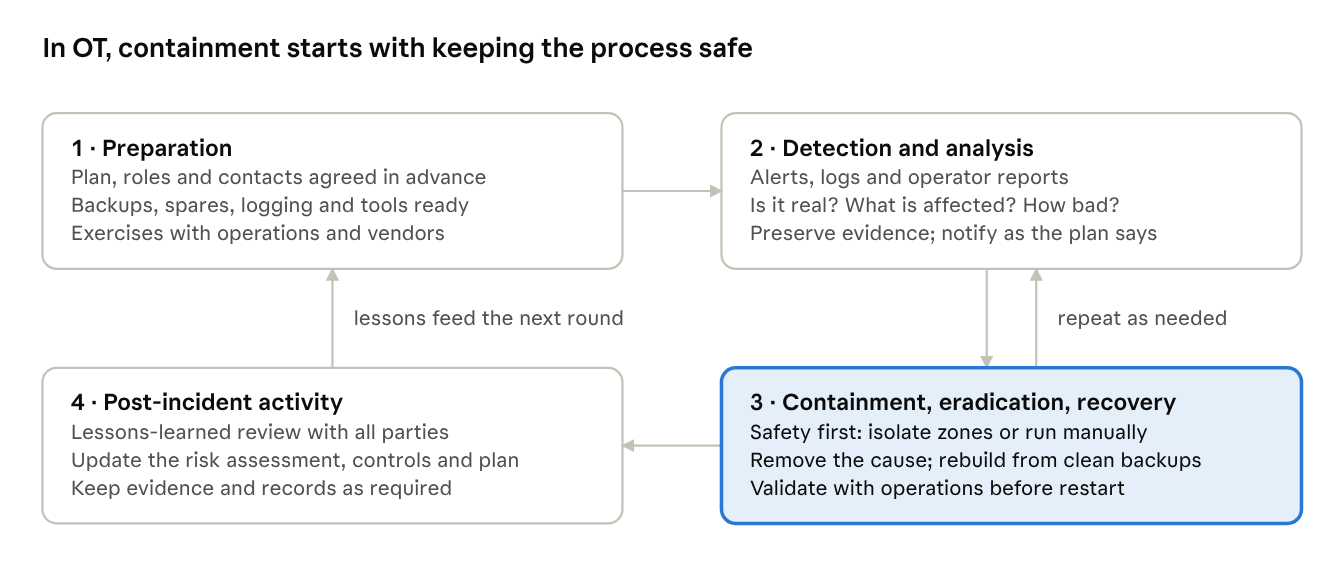
What an OT incident response plan contains
- Scope and severity levels: what counts as an incident and how severity is graded.
- Roles and contacts: incident lead, operations, OT and IT security, process safety, communications, legal and management, plus vendors and integrators, with contact lists that work around the clock.
- Decision authority: who may isolate a zone, cut the business connection or shut the process down.
- Playbooks for likely cases: ransomware in the business network or DMZ, malware on an HMI, an unauthorized controller change, stolen remote access credentials.
- Out-of-band communication that still works if email and phones on the corporate network do not.
- Notification duties: internal escalation, regulators, national CERTs, insurers and law enforcement. Some deadlines are measured in hours, so know them in advance.
- Evidence handling, recovery priorities, and a schedule of exercises.
Containment options in OT each have trade-offs, so decide them with operations and process safety:
| Option | Effect |
|---|---|
| Cut the conduit between business and control networks | Control keeps running while isolated from the infection |
| Isolate the affected zone | Limits spread; neighbors keep running |
| Disable compromised accounts or remote access | Removes the attacker's way in |
| Switch to manual or local control | Keeps the process safe while systems are cleaned |
| Keep running under close watch | Avoids causing the outage an attacker wanted, where it is safe to do so |
Pulling cables from controllers at random can do more harm than the attack.
Evidence and forensics. Where it is safe, collect the most volatile data first: memory and live network connections before disk images and logs. Capture network traffic, hash everything, record the chain of custody and keep a timeline. For controllers, compare logic and firmware with the approved versions, with vendor help if needed.
Eradication and recovery. Find the root cause and entry point, remove the malware and any persistence, reset credentials, fix the exploited weakness, rebuild from known-good images and backups, verify controller logic, restore in stages, and watch closely afterward.
Post-incident activity. Hold a lessons-learned review soon after, update the plan, the risk assessment and the controls, track measures such as time to detect, contain and recover, and share information with your ISAC where appropriate. NIST SP 800-61 Rev. 3 (2025) reorganizes this guidance around the CSF 2.0 functions, but the activities are the same.
Exercises. Tabletop exercises and drills that include operations and vendors find the gaps before a real incident does.
Exam angle: safety comes first; containment is decided with operations; preserve evidence where safe; restore only from clean backups and verify the logic; lessons learned close the loop.
10 · Management of change, configuration management and audits
Management of change (MOC) keeps every change controlled, including security changes.
- Request: what, why, who, when, and which systems and zones are affected.
- Assess impact on safety, security (a new port, account, connection or zone boundary?), operations and compliance; reassess risk if the change is significant.
- Approve by the people authorized for that class of change.
- Plan and test: test off production, take a backup, write the rollback plan, book the window.
- Implement by an authorized person, following the plan.
- Verify that it works and that security controls are intact.
- Document and close: update the inventory, drawings, baselines, backups and, if needed, the CRS.
| MOC form field | Why it is there |
|---|---|
| Description and reason | Makes the purpose reviewable |
| Affected assets and zones | Shows the scope of impact |
| Safety, security and production impact | Forces the questions to be asked before, not after |
| Test, backup and rollback plan | Makes failure recoverable |
| Approvals | Shows the change was authorized |
| Verification results | Proves the change worked |
| Documentation updated | Prevents drift between records and reality |
Classes of change. Standard changes are pre-approved, low-risk and routine, such as a tested signature update. Normal changes follow the full process. Emergency changes get fast approval and are documented and reviewed afterward.
Configuration management (62443-2-4 SP.06) keeps approved baselines and version histories of controller programs and device configurations, and compares running configurations with them. An unexplained difference is an unauthorized change until proven otherwise, and a possible incident.
A basic cybersecurity audit
- Purpose: check that policies and procedures are followed and controls still work. An audit measures conformance with stated criteria; a risk assessment judges risk.
- Plan: scope, criteria (the owner's policies, 62443-2-1, contract requirements under 62443-2-4, the CRS), an auditor independent of the work being audited, and a schedule.
- Evidence: records such as MOC tickets, backup logs, patch reports and account reviews; interviews; observation; technical checks of configurations against baselines.
- Sampling: pick samples of changes, accounts and assets to trace end to end.
- Findings: each with criteria, evidence and severity; a corrective action plan with owners and dates; and follow-up to confirm closure.
| Area | What to check |
|---|---|
| Accounts | Leavers disabled; privileged accounts reviewed; shared or default accounts only as documented exceptions |
| Patching | Status against policy; deferred patches covered by compensating controls |
| Backups | Recent and complete, with an offline copy and restore-test records |
| Malware protection | Signatures current; allowlisting enforced |
| Firewall rules | Each rule justified and reviewed; no any-to-any rules |
| Remote access | Sessions approved and logged; vendor accounts disabled when idle |
| Change control | Changes found on systems match approved MOC records |
| Logging | Logs collected, time-synchronized and reviewed |
Useful measures: share of systems patched within target, time to detect, accounts reviewed on schedule, backup success and restore tests, and unauthorized changes found.
Exam angle: every change goes through MOC, security changes included; emergency changes are reviewed afterward; compare running configurations with approved baselines; audit findings need criteria, evidence and tracked corrective action.
Exam traps, tie-breakers and sources
Pairs that get mixed up
| Easily confused | The difference |
|---|---|
| IDS and IPS | Alerts from a copy of the traffic; sits inline and blocks |
| NIDS and HIDS | Watches network traffic; watches one host's files, logs and processes |
| SPAN and tap | Switch configuration that can drop packets under load; passive hardware that copies everything |
| Signature and anomaly detection | Known patterns; departures from a learned baseline |
| Antivirus, blocklisting, allowlisting | Known-bad signatures; a list of banned programs; only approved programs run |
| RPO and RTO | How much data you can lose; how long you can be down |
| Incremental and differential backup | Changes since the last backup of any kind; changes since the last full backup |
| Authenticated and unauthenticated scan | Logs in and reads versions; sees only what the network exposes |
| Audit and risk assessment | Checks conformance with criteria; judges risk |
| Standard and emergency change | Pre-approved routine change; fast approval with review afterward |
| SNMPv1 or v2c and SNMPv3 | Clear-text community strings; authentication and encryption |
First steps the exam likes to ask about
- A new advisory: check the inventory to see whether it applies, then assess and wait for vendor qualification.
- Before any patch or change: a backup and a rollback plan.
- An OT incident: keep people and the process safe, then contain.
- Restoring after an attack: confirm the backup predates the compromise and is clean.
- A network fault: start at the physical layer.
- An unknown device on the network: identify it before blocking it.
- New firmware: verify its signature or hash.
Tie-breakers for BEST answers
- Safety and availability come first.
- Passive methods before active ones on live systems.
- Test off production and back up before changing anything.
- Every change goes through management of change.
- Use vendor-qualified patches, antivirus settings and tools.
- If it is not documented, it did not happen: records, baselines and evidence matter.
Event shorthand: 4624 logon, 4625 failed logon, 4720 account created, 4740 lockout, 4688 new process, 7045 new service, 1102 audit log cleared. Syslog runs from 0 (emergency) to 7 (debug).
Sources
- ISA: IC37 course description, certificate program FAQ, certificate exams and testing
- Fraunhofer course page for IC37
- Snort
- NIST: SP 800-61 Rev. 2, SP 800-61 Rev. 3, SP 800-82 Rev. 3
- CISA KEV catalog
These notes paraphrase and summarize. They do not reproduce the standards, so check details against your licensed copies and your vendors' documentation.